

Get This Station On Your Sonos System
RadioPup, the music-streaming app, which features this station and more than 300 other local radio stations playing the best music and news available, now has a great new partner: Sonos wireless systems. Here’s an easy guide for how to find radioPup and add it to your Sonos home system:
1. On your iOS or Android Sonos Controller app, tap the “Add Music Services” button:

2. Scroll down until you see radioPup and tap it:

3. Tap the “Add Account” button and you’re all set to listen to radioPup through your Sonos system:

4. On the Sonos desktop app, all the beta music services are listed under the Sonos Labs section:
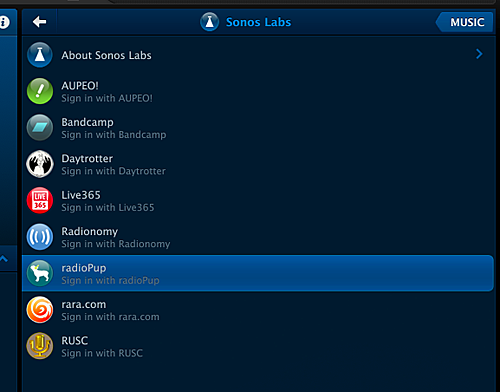
It’s currently in a public beta mode, so if you add it to your home system, be sure to send in feedback so we can keep improving it!
More From AM 1450 and 95.1 FM
![Montana Insurance Commissioner in China for Strategic Dialogue [AUDIO]](http://townsquare.media/site/119/files/2014/07/Monica-LIndeen-and-Chinese-Official.jpg?w=980&q=75)


![Planning A Trip To Glacier National Park? Listen To This! [AUDIO]](http://townsquare.media/site/8/files/2014/07/80156423.jpg?w=980&q=75)



![KGVO Morning News Headlines for Thursday July 10 [VIDEO]](http://townsquare.media/site/119/files/2014/07/police-car-jon-king.jpg?w=980&q=75)